case studies> case study 2: Sknow Buddy


Sknow Buddy
"Know" in the Snowlearn how to snowboard
A CASE STUDY
Spring 2018
WNM 700 Human Centered Design
Instructor Collin Sebestyen
Design Abstract
The Problem:
Is there a way to help people learn how to snowboard? It seems that there is a learning curve that takes about three days and people sometimes quit before they get through it. People have a harder time learning on their own or without an instructor. There is a saying, "don’t let friends teach friends how to snowboard. The main problem is that beginners repeat the same mistakes. Is there a way to design an solution to help them through corrective analysis? The snowboarding industry is on the decline because beginners quit before the three day learning period.
The Challenge:
Can mobile technology help in snowboard instruction?
The Constraints:
hands, gloves, terrain, weather
The Solution:
A multi-sensory learning app with a collaborative social support system for beginners.
Inspirations
-
Ride On Ski Goggles
Augmented Reality Ski Goggles

The Ride On goggles are the technical features: a hands free device, bluetooth, video capabilities, microphone, GPS, and social media synching. This product would instantly solve the constraint problems.
-
Altos Adventures
Animated Vector Illustations

This app inspired me because it captures the feeling of snowboarding in a digital realm, opening up visual possibilities of how to translate snowboarding through storytelling and animated scenic illustrations.
-
Instructors Handbook
Learning Tool: Sequence Photo

I realized there are not a lot of visual aids in helping you learn to snowboard. There were more visual learning aids in traditional media, that have not yet translated to our current digital media.
The Need
• The biggest pitfalls people make when learning how to snowboard, from an instructor’s point of view is incorrect body positioning.
• Friends and family that know how to ride, do not necessarily have the knowledge or experience to teach. It is difficult for an advanced rider to put themselves in the shoes of a beginner, to have the patience to help through the path of progression.
• Video and audio learning and comparison analysis can be a useful tool in instruction. The design constraint or problem with using mobile handheld device is that users will not have hands or eyes available at the time being while snowboarding. Overall, there is a need for knowledge source and tools to assist in learning to ride.
Interviews
Contextual Location:
Beginner Hill, Canyon Lodge, Mammoth Mountain Ski Resort
Targeting Interviewees:
- • Middle aged beginner self taught, a member of the target audience
- • An Instructor, a topic expert
- • A young adult, instructor taught
Goals / Objective:
- • To validate or crush assumptions
- •Discover true user needs
| Assumptions: | Results: |
|---|---|
| Board sports will make snowboarding easier | *crushed |
| People might be learning on the wrong foot | *crushed |
| There is a need for interactive teaching media | validated! |
| It takes three days to learn | validated! |
| People need corrective analysis | validated! |
Interview 1:
- DATE: FEB 23, 2018
- NAME: STELLA
- OCCUPATION: STUDENT
- ORIGIN: HOLLYWOOD, CA
- AGE: 15

Transcript:
- Are you learning how to snowboard today?
- This is my second day.
- How is going? Do you think its hard to do?
- No not really.
- Did you take a lesson?
- I did yesterday.
- What do you think you learned from the lesson that is helping with your snowboarding today?
- Learning how to stop on your heels and turning on your toes.
- Are you regular or goofy foot?
- Regular.
- How did you find out?
- I skateboard and thats the way I skateboard.
- Why didn’t you dad teach you if he knows how to snowboard?
- He didn’t know if he was going to have the time.
Interview 2:
- DATE: FEB 23, 2018
- NAME: Chris Mears
- INCOME: 60,000
- ORIGIN: COSTA MESA, CA
- GENDER: MALE
- AGE: 26

Transcript:
- Are you learning how to snowboard today?
- No.
- How many times have you snowboarded before?
- This is my fourth day, we have been here all week.
- Did you take a lesson?
- No, I taught myself. I didn’t think I needed a lesson.
- How did you teach yourself? Did you find it hard, what was your experience?
- I tried for one day three years ago, and it was a disaster I ended up quitting. So this year I watched a YouTube video channel, SnowboardProCAmp and I am doing much better, I must have watched those videos a hundred times each last week before I came, And made sure to take it slow.
- What did it help you with?
- The heelside falling leaf.
- Do you practice any other boardsports?
- I surf, but I don’t think that helped, they are different.
- Do you go to other mountain resorts, you mentioned you went three years ago?
- Mostly mammoth, I went to big bear a long time ago but have plans to come back to mammoth next year.
- Did you like Big Bear?
- Well, I actually tried snowboarding for the first time there and ended up quitting, it was a disaster, and i ended up quitting,so this year I was determined and prepared, I must have watched those videos 100 times over the past few months before I came, and it helped immensley.
Interview 3:
- DATE: FEB 23, 2018
- NAME: Culver Bradburry
- OCCUPATION: snowboard instructor
- ORIGIN: Maryland
- GENDER: MALE
- AGE: 47

Transcript:
- What do you think the common pitfalls of beginners are?
- Improper Body Positioning and repeating the same mistakes over and over again, also weak muscles and improper physical fitness.
- What do you think they could correct these mistakes if you are not around?
- Video analysis helps, degree of looking .
- Do you ever feel like a robot teaching the same thing over and over again?
- I like to keep it fun! Try to make it fun for everyone.
- I think it would help to get knowledge from whatever source you can find it from?
Persona
(Real life Persona based on Interview)
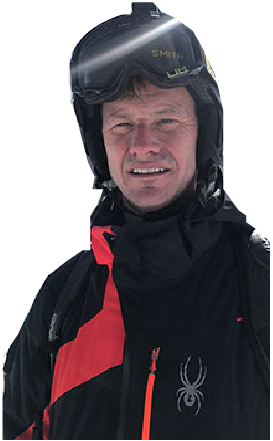
- DATE: FEB 23, 2018
- NAME: Chris Mears
- INCOME: 60,000
- ORIGIN: COSTA MESA, CA
- GENDER: MALE
- AGE: 26
Snowboarder Type:
Adult, first time-
Need Statement:
The first time I tried sknowboarding it was a disaster! I ended up quitting, but this year I wanted to try again. I watched a You Tube video series about 100 times -
Snowboarder Level:
Beginner to Intermediate -
Motivation Level:
High, determined -
Snowboarder Level:
Beginner to Intermediate -
Goals:
- •To learn to snowboard and not give up
- •To prepare and gain knowledge first
- •To watch videos on instruction and apply them
-
Frustrations:
spending the time and energy and money without accomplishment -
Tech Habits:
Facebook, watches instructional videos, posts accomplishments
Target Audience & Positioning

Target Audience:
My target audience consists of beginners to intermediate riders, focsuing on the first three days of learning. Adults are my primary target audience. People of median income that can afford a lift ticket but not neccessarily private ski instruction. This demographic group is generally image conscious.
Unique Positioning:
There are apps in other sports such as tennis and golf that get feedback on body positioning. There are currently augmented reality goggles that record video that are targeting on the hill advanced snowboarders ages 14-30, however there lacks a mobile instructional app created for beginner snowboarders. The mobile apps on the market now are poorly executed and lack users participation.
The Design Process
User Task Flow to Wireframes


Task : Input Skill Level

Task : View Progression
IA & Task Flow

First Prototype Iteration
Low Fidelity


prototype link
Feedback & Prototype Analysis
Success:
Guiding the user through a linear instructional progression
Using a Combination of Visual, Audio, and Analysis Tools for learning

Problems / Concerns:
Will the phone work in cold weather?
Is it dangerous to be distracted by the app?
Will the interface work with gloves?

User Research
Field Observations


1. People helping other learn: 90%
2. People learning by themselves: 10%
3. People using cell phones to video record the person they are learning with: 70%
30 beginners (target audience) observed.
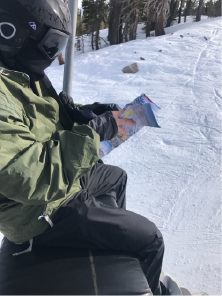
4. Glove Use On/ Off:
a) gloves off when in chair line
b) gloves on when actually snowboarding
c) gloves off when recording
d) gloves off when looking at map
User Testing Round 1
The Glove Test

Results
• Failed to navigate screens due to buttons being too close in proximity too close in proximity• Same results 3 users tested
• Same results 3 users tested
The Plan
• More User Research- Field Observation• More Design Thinking
• More Topic Research
• User Storyboarding
User Storyboard
mapping the user story:
When going throught the steps in a first time snowboarders experience of figuring out where they would use the app, when they would use the app, and what type of physical activity they were participating in already. It was immediately apparent when imagining the scenario of the user. There would be a time to prepare, a time to refect, and a time to engage in learning. This reshaped the projcet into having two different modes. One for learning on the slopes and the other for inspiration, preparation, and to gain knowledge in reflection after. The green post its are for loddge mode and the orange for on slopes tasks. Why two modes? The user would not need all the features the app offers for one task, and likewise would not need the other features while performing another task. I had to imagine what the steps and tasks of the beginning snowboarder fram by frame. Drawing helped to think about the users location and environment first.

Topic Research
1) The Emotional Fustration of Atheleticism
https://www.huffingtonpost.com/

2) The Reflective Level in Emotional Design (tell stories)
https://www.interaction-design.org/literature/article/the-reflective-level-of-emotional-design

3) The Trend of Tech Powered Collaborative Blended Learning
https://www.kqed.org/mindshift/7854/three-trends-that-define-the-future-of-teaching-%20and-learning

Second Prototype Iteration
Medium Fidelity
Intro / Onboarding Screens

1. Landing / Onboarding

2. Onboarding: Goals

3. Onboarding: 2 Modes
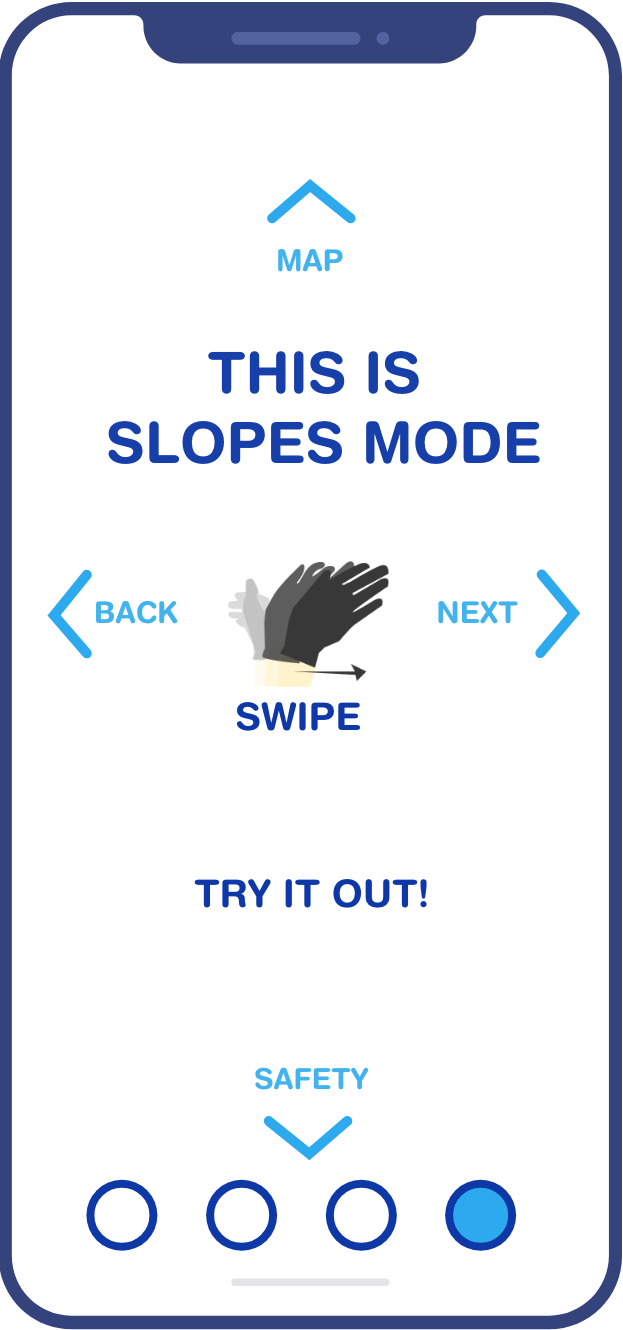
4. Onboarding: Slopes Mode Demo
Lodge Mode
lodge mode

6.Input Skill Level
lodge mode

7. Lesson 1:
Review Gear
lodge mode

8. Lesson 1:
Gear Detail
lodge mode

9. Lesson 1:
Skill Overview
Slopes Mode - Voice Commands -"Yeah Buddy!"
lodge mode

10. Lesson 1:
Skill Detail
slopes mode

11. Skill Demo Video
slopes mode

12. Skill Practice Play
slopes mode

13. Skill Audio Pause
Snow Name Generator / Video Request
lodge mode

14.
lodge mode

title
slopes mode

record request
lodge mode

record other person
Lodge Mode Video View (Reflection)
lodge mode

comparison analysis
user vs. pro demo
lodge mode

video gallery
all user recordings
Conclusion
Next Steps:
Several more rounds of user testing is needed on the slopes. One test to identify the snowboarder and loacation requesting video. Creating the progression lesson script and recording audio would be needed to test the audio lesson and voice commands. On-snow testing wouldbe helpful in maping out where and when the locations of Slope mode and Lodge initialize, where the GPS boudaries would be sectioned. After another round of testing another iteration could be made. Only then, a high fidelity prototype needs to be created. Now the visual design and branding process can begin.
The main user goal to accomplish from the user research, topic research, and interviews is to see yourself on video so you can correct your body positioning.
